
WooCommerce Checkout Age Check, Order Hold & Adult Signature
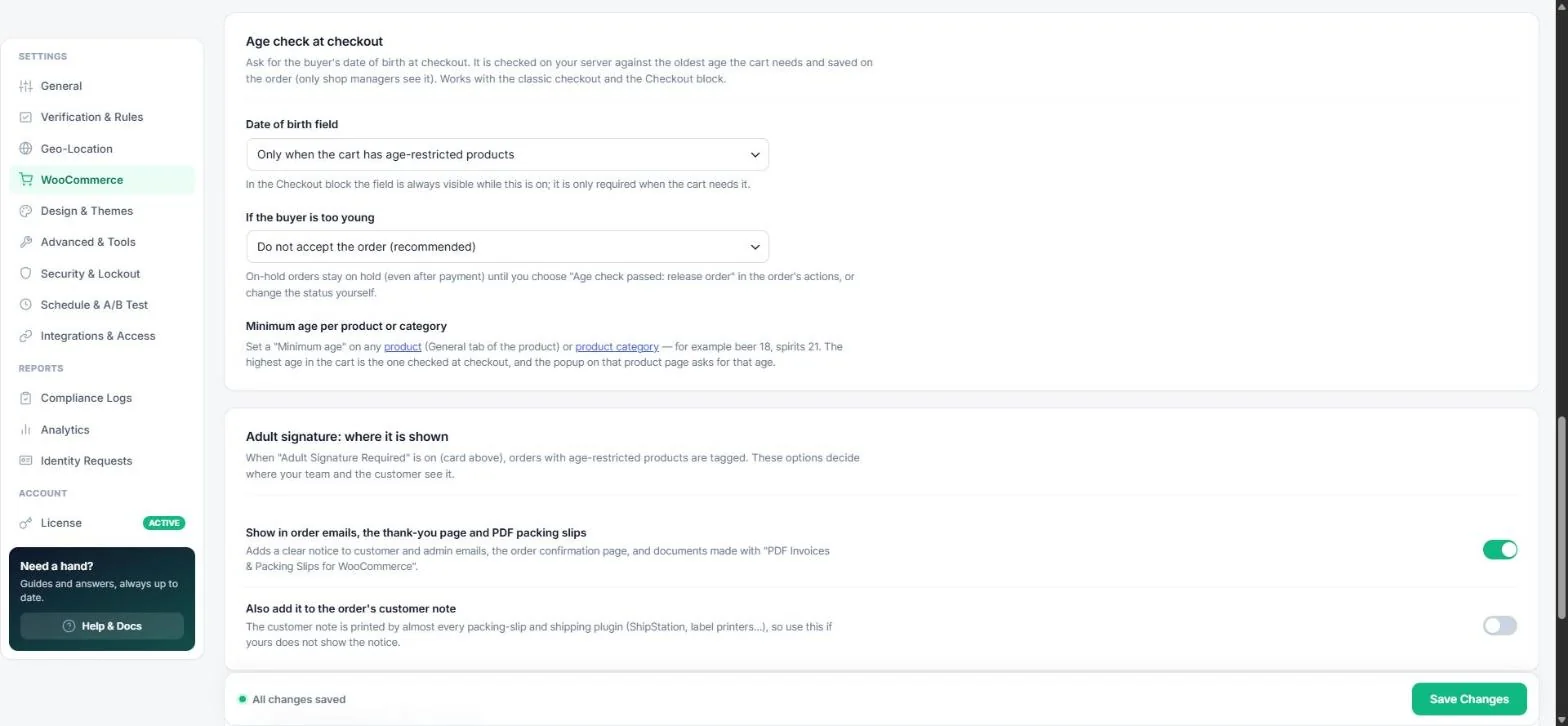
For a check that holds up in an audit, ask for the buyer's date of birth at checkout. It is checked on your server against the oldest age the cart needs and saved on the order. Works with both the classic checkout and the Checkout block.
Add the date-of-birth field
- Open Age Verification → WooCommerce → Age check at checkout.
- Set Date of birth field to Only when the cart has age-restricted products (recommended) or On every order.
- Choose what happens if the buyer is too young:
- Do not accept the order (recommended) — checkout shows an error.
- Accept but keep it on hold — the order stays on hold, even after payment, until you review it.
- Save and place a test order.
Note: Only shop managers and administrators can see the saved date of birth on the order.
Release a held order
Open the order and choose Age check passed: release order from the order actions (or change the status yourself). Held orders can also trigger the order.age_hold webhook — handy for a Slack alert.
Minimum age per product or category
Set a Minimum age on any product (General tab of the product) or product category — for example beer 18, spirits 21. The highest age in the cart is the one checked at checkout, and the popup on that product page asks for that age.
Adult signature for shipping
- Turn on Enable “Adult Signature Required” tag (Shipping & Compliance Logistics card). Orders with restricted items get the hidden meta
_adult_signature_requiredand an order note. - Under Adult signature: where it is shown, show the notice in order emails, the thank-you page and PDF packing slips.
- If your shipping plugin (ShipStation, label printers…) does not show it, also add it to the order's customer note.
Tip: Combine with Inline checkout lock on the WooCommerce tab for a smooth, popup-free store.
Read next
Was this guide helpful?