
Login Protection: Country Allow-List & Lockouts
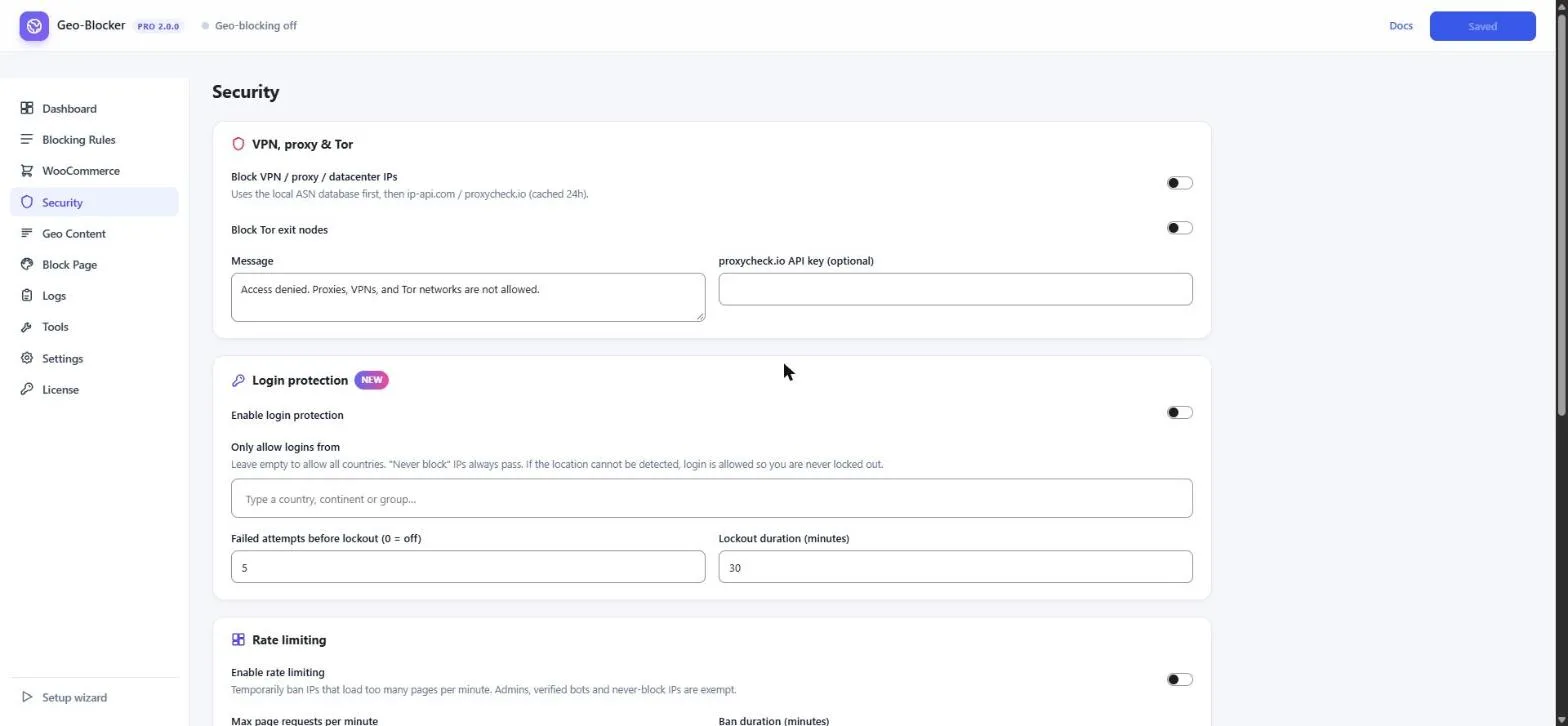
Most brute-force attacks on wp-login.php come from countries where you have no users. Login protection stops them at the authentication step, without changing your login URL. Find it under Geo-Blocker → Security → Login protection.
1. Only allow logins from your countries
Switch on Enable login protection.
In Only allow logins from pick your countries (continents and groups work too, e.g. GROUP:EU).
Save.
A login attempt from any other country is refused with "Logging in is not allowed from your location." – even with the correct password. It is logged as Login blocked.
2. Lock out repeated failures
Failed attempts before lockout – default 5 (0 turns it off).
Lockout duration – default 30 minutes.
After too many failed logins from one IP, that IP can't log in at all (even with the right password) until the lockout ends. A successful login resets the counter.
You can't lock yourself out by accident
IPs in Blocking Rules → Never block these IPs are never refused or locked.
If the location cannot be detected, the login is allowed.
Private / local network IPs are always allowed.
Unlock an IP
Tools → Maintenance → Unban, or wp ygb unban 203.0.113.7. The Rule simulator shows whether an IP is currently locked.
Works with
The standard login form, WooCommerce My Account login and XML-RPC authentication (all use WordPress's authenticate filter). Custom login pages that use wp_signon() are covered too.
Want to hide wp-login completely?
Use a custom rule: Page URL contains wp-login.php AND Country is none of BD → Block. Visitors from other countries then see the block page instead of the login form.
Was this guide helpful?