
Rule Builder: Custom Rules with Conditions
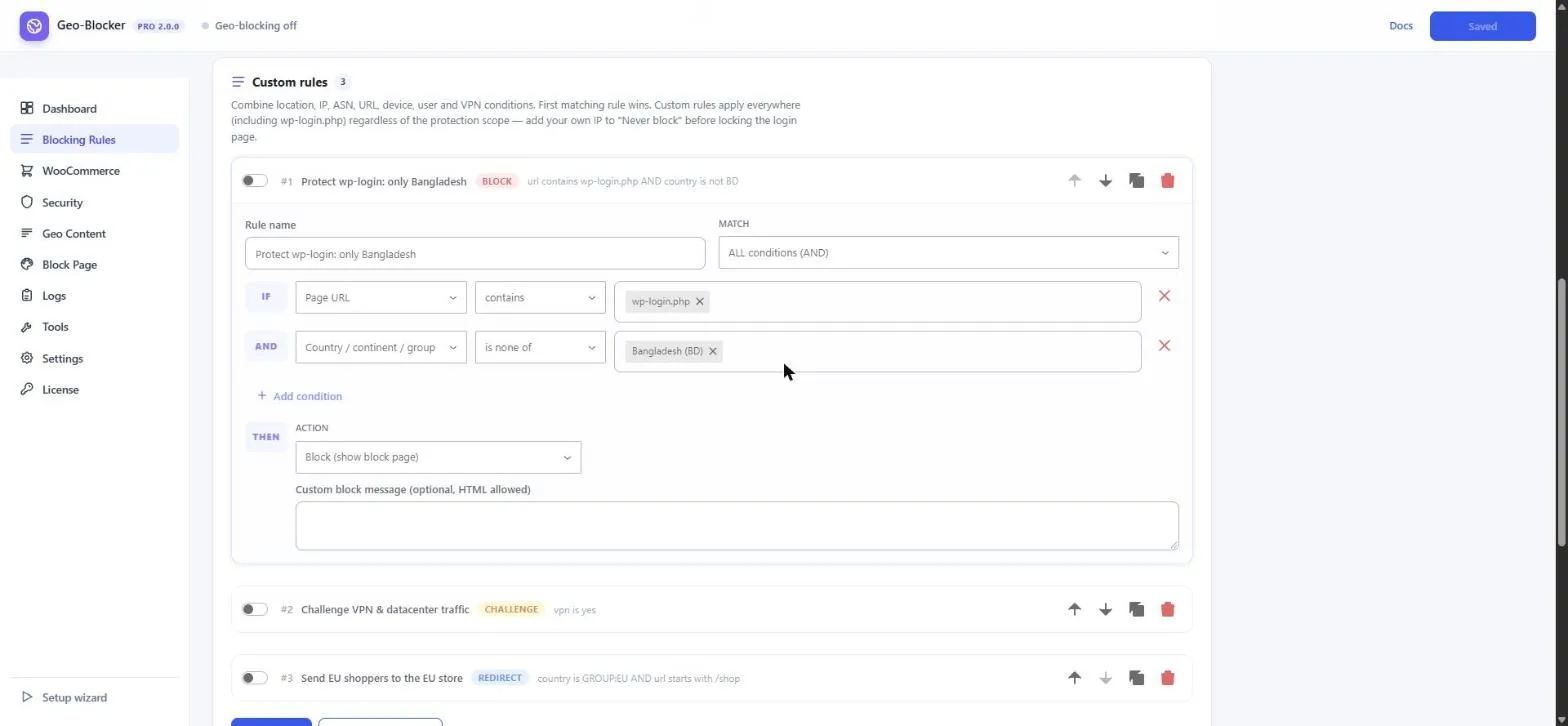
The Rule Builder lets you write your own "IF … THEN …" rules – far more precise than country blocking alone. Find it under Geo-Blocker → Blocking Rules → Custom rules.
How rules work
Rules run top to bottom, before the general geo-blocking settings. The first matching rule wins; nothing after it is evaluated.
Each rule has one or more conditions joined by ALL (AND) or ANY (OR), and one action.
Rules apply everywhere – including
wp-login.phpand wp-admin – regardless of the protection scope. Administrators who are logged in, IPs in Never block, bypass-link holders and verified search engines are never affected.
Conditions
Condition | Operators | Example |
|---|---|---|
Country / continent / group | is any of / is none of | RU, CONT:AS, GROUP:EU |
State / region | is / is not / contains | California, CA |
City | is / is not / contains | London |
IP address / CIDR | is any of / is none of | 203.0.113.0/24, 2001:db8::/32 |
ASN (network) | is any of / is none of | 14061 (DigitalOcean), 16509 (AWS) |
Page URL | contains, does not contain, starts with, is exactly, matches regex | /wp-login.php, ^/shop/ |
Referrer | same as URL | facebook.com |
User agent | same as URL | curl, python-requests |
Device | is | Mobile / tablet or Desktop |
Logged in | is | Yes / No |
User role | is any of / is none of | Customer, Subscriber |
Browser language | is any of / is none of | bn, en-US |
VPN / Proxy / Tor | is | Yes / No |
ASN rules need the MaxMind ASN database (installed together with the City database).
Actions
Block – shows the block page (optionally with a custom message for this rule).
Redirect – sends the visitor to a URL with 302, 301 or 307.
Challenge – asks the visitor to pass a human check (JavaScript proof-of-work or Cloudflare Turnstile); passing lets them in for 24 h.
Allow – lets the visitor in and skips every rule below, VPN blocking, redirects and general geo-blocking. Perfect for exceptions.
Create a rule
Click Add rule or Start from a template.
Give it a name, choose ALL/ANY and add conditions.
Choose the action and click Save changes.
Use the arrows to reorder, the copy icon to duplicate, the toggle to disable temporarily.
Ready-made templates
Protect wp-login: only my country – URL contains wp-login.php AND country is none of BD → Block.
Challenge datacenter & VPN traffic – VPN is Yes → Challenge.
Redirect EU visitors to EU store – country is GROUP:EU AND URL starts with /shop → Redirect.
Block scrapers by user agent – ANY of curl, wget, python-requests, scrapy → Block.
Always allow my office network – IP is 203.0.113.0/24 → Allow.
Before you lock the login page
Add your own IP to Never block these IPs and test with Tools → Rule simulator (tick "Admin / login area"). If you ever lock yourself out, rename the plugin folder via FTP/File Manager to disable it, or use wp ygb settings set rules '[]'.
Was this guide helpful?